Tutorial: Acoustic streaming in a DC mould
This tutorial describes how to pre-process, run and post-process an acoustic streaming case with acousticStreamingFoam.
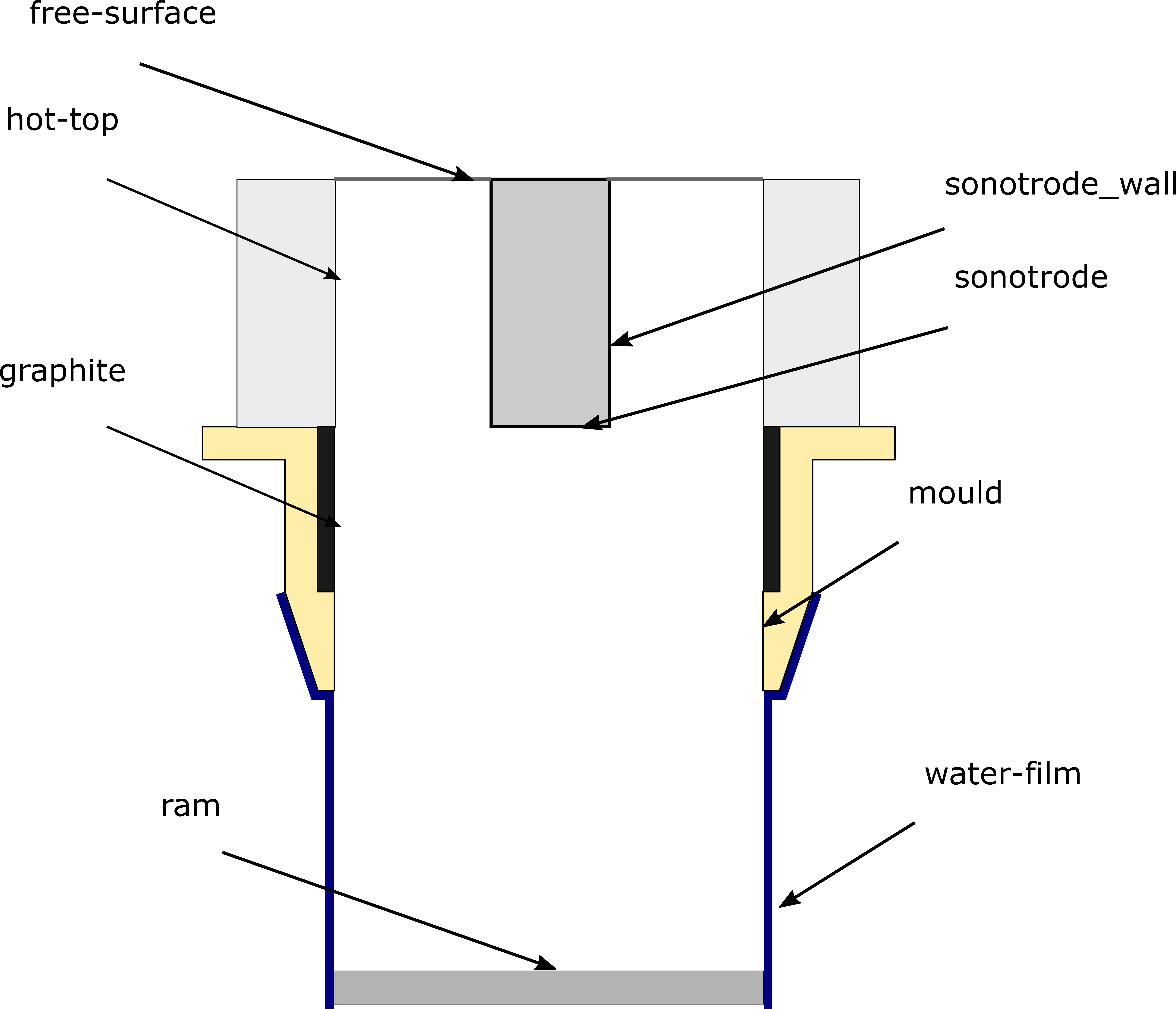
The USDC casting geometry that is used in this tutorial.
Pre-processing
Change to the case directory.
$ cd acousticStreamingFoam/tutorials/helmholtz/acousticStreamingFoam/USDC
Mesh generation
Generate the mesh.
$ cd ..
$ blockMesh
Boundary and initial conditions
Acoustic pressure
The complex acoustic pressure \({P}\) is calculated by solving for its
real and imaginary parts separately. The real and imaginary parts of the
acoustic pressure, \(\Re(P)\) and \(\Im(P)\), at the sonotrode are
therefore prescriped in separate files: 0/p_Re and 0/p_Im.
sonotrode
{
    type            fixedGradient;
    gradient        uniform 4e7;
}
Physical properties
Transport properties
The transport properties are prescribed in the constant/transportProperties dictionary file.
Example usage:
nu     [ 0  2 -1 0 0 0 0 ] 1e-05;
// Acoustic properties
omega  [ 0  0 -1 0 0 0 0 ] 125663.70614359173;
c      [ 0  1 -1 0 0 0 0 ] 4600.0;
rho    [ 1 -3  0 0 0 0 0 ] 2378.652;
phorn  [ 1 -1 -2 0 0 0 0 ] 5e5;
pblake [ 1 -1 -2 0 0 0 0 ] 320386.12807758985;
N      [ 0 -3  0 0 0 0 0 ] 1.0e3;

AbyN
{
  type                table;
  format              foam;
  file                "constant/AbyN";
  outOfBounds         clamp;
  interpolationScheme linear;
}

BbyN
{
  type                table;
  format              foam;
  file                "constant/BbyN";
  outOfBounds         clamp;
  interpolationScheme linear;
}
\(\frac{\mathcal{A}}{N}\) and \(\frac{\mathcal{B}}{N}\) values
will be interpolated based on the acoustic pressure in the solver stage, and
are therefore entered as Foam::Function1 interpolation tables.
Control
Discretization and solver settings
Discretization schemes are entered in the system/fvSchemes dictionary file.
gradSchemes
{
    ...
    grad(p_Im)      leastSquares;
    grad(p_Re)      leastSquares;
}

laplacianSchemes
{
    ...
    laplacian(p_Re) Gauss linear corrected;
    laplacian(p_Im) Gauss linear corrected;
}
The number of acoustic corrector loops is prescribed in the PIMPLE entry of the system/fvSolution dictionary file.
PIMPLE
{
    ...
    nacousticCorrectors 5;
}
\(\Re(P)\) and \(\Im(P)\) are difficult to solve and require a suitable preconditioner:
"p_(Re|Im)"
{
    preconditioner
    {
        preconditioner FDIC;
        tolerance      1e-04;
        relTol         1e-01;
        smoother       DICGaussSeidel;
        cacheAgglomeration yes;
    }
    solver           PBiCGStab;
    smoother         DILU;
    tolerance        1e-06;
    relTol           1e-02;
    minIter          1;
    maxIter          5000;
}
Run the application
In the case directory, run:
$ acousticStreamingFoam
Post-processing
Contour plots
The jet profile can be plotted from the VTK files that are saved in the
postProcessing directory using the USDC.plot_jet.plot_jet() function.
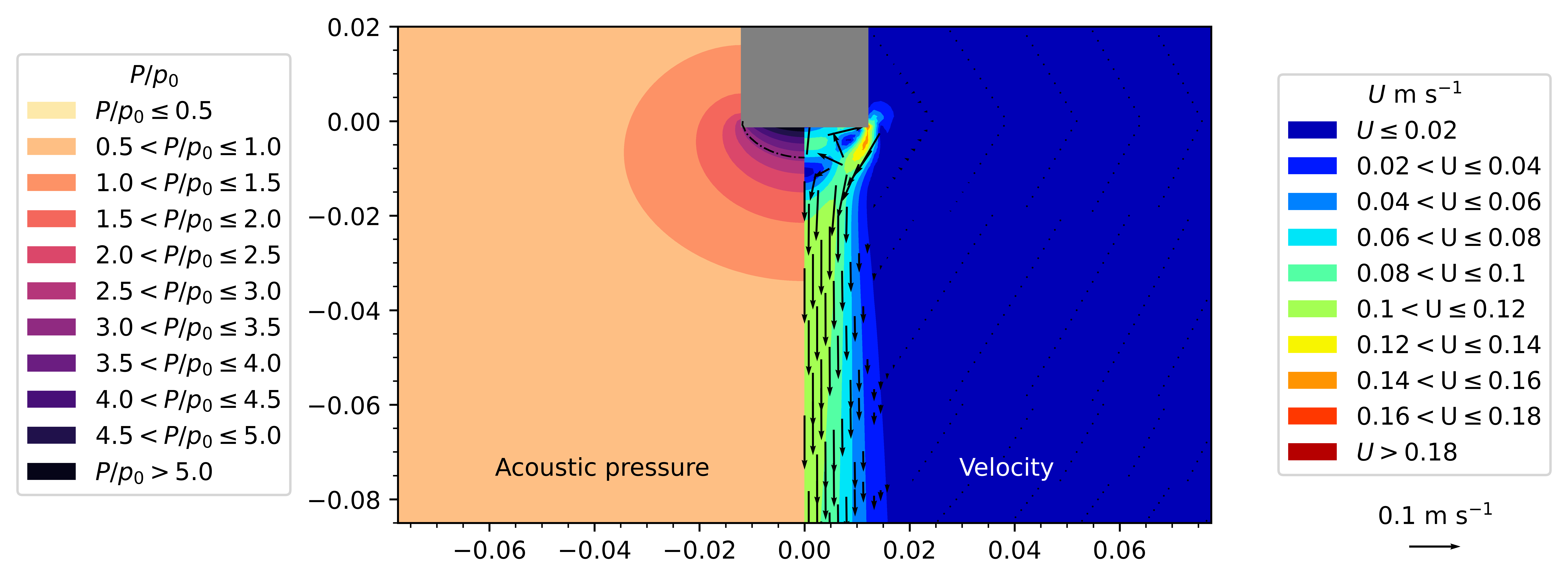
LHS: Predicted acoustic pressure normalized by the atmospheric pressure \(p_{0}\). The dotted lines denote the Blake pressure threshold. The bubbles effect on sound propagation is modelled only when \(P > P_{0}\). RHS: The predicted acoustic streaming jet.
